Exam Timetable Planner
Automated Exam Scheduling System for Educational Institutions
- What: Desktop app that auto-generates conflict-free exam schedules
- How: CSP solver with backtracking + heuristics (binary search on days)
- Scale: Tested with 10k+ students, ~120 unit tests, generates in <2s
- Run:
git clone ... && mvn javafx:run - Status: Functional prototype (academic project, not production-packaged)
1 Introduction
Exam Timetable Planner is a standalone desktop application designed to automatically generate optimized exam schedules for educational institutions. The system processes courses, classrooms, student enrollments, and predefined business constraints to produce a conflict-free and efficient exam timetable.
The primary users of this application are Student Affairs personnel responsible for creating and maintaining examination schedules. The application aims to reduce manual scheduling effort and eliminate human errors in the complex process of exam timetabling.
This application is developed as a cross-platform desktop solution compatible with Windows, macOS, and Linux operating systems.
2 Project Objectives
The main objectives of this project are:
- Automation: Eliminate manual exam scheduling by implementing an intelligent algorithm
- Constraint Satisfaction: Ensure all scheduling rules and institutional policies are respected
- User-Friendly Interface: Provide an intuitive GUI for data import, visualization, and manual adjustments
- Flexibility: Allow manual overrides with real-time constraint validation
- Scalability: Support large-scale institutions with 10,000+ students
- Data Export: Enable exporting of finalized timetables for external use
3 Key Features
CSV Data Import
Import course, student, classroom, and attendance data from standard CSV files with flexible format support.
Smart Scheduling
Advanced algorithm automatically generates efficient exam timetables while respecting all defined constraints.
Visual Timetable
View the master exam schedule in a clean, structured table format with intuitive navigation.
Advanced Search
Quickly search schedules by student ID or course code with real-time filtering capabilities.
Manual Override
Manually modify exam times and classrooms with instant constraint validation feedback.
Export Options
Export final timetables for external use in various formats for sharing and printing.
4 Screenshots & Demo
Visual demonstration of the application's key screens and functionality.
Main Dashboard
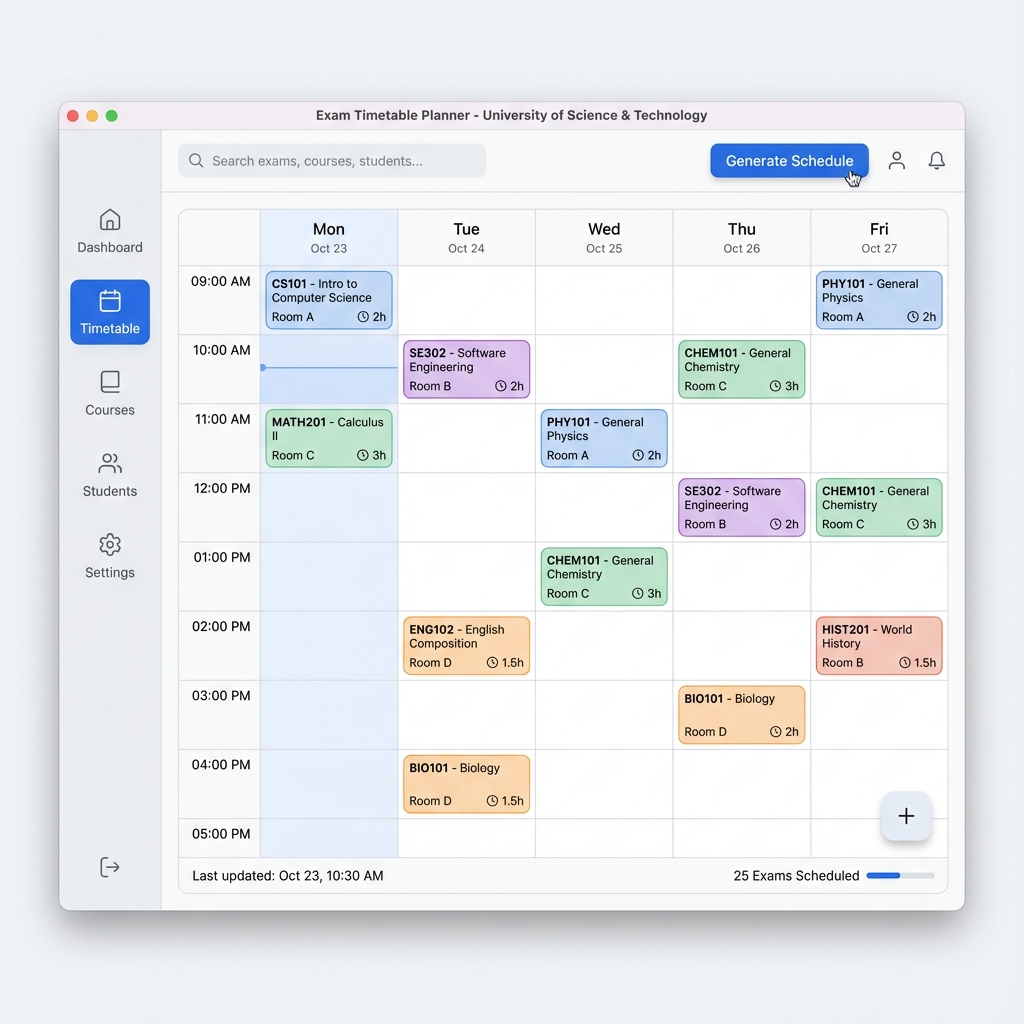
Figure 1: Main application dashboard with analytics and quick actions [Screenshot from actual build]
Data Import
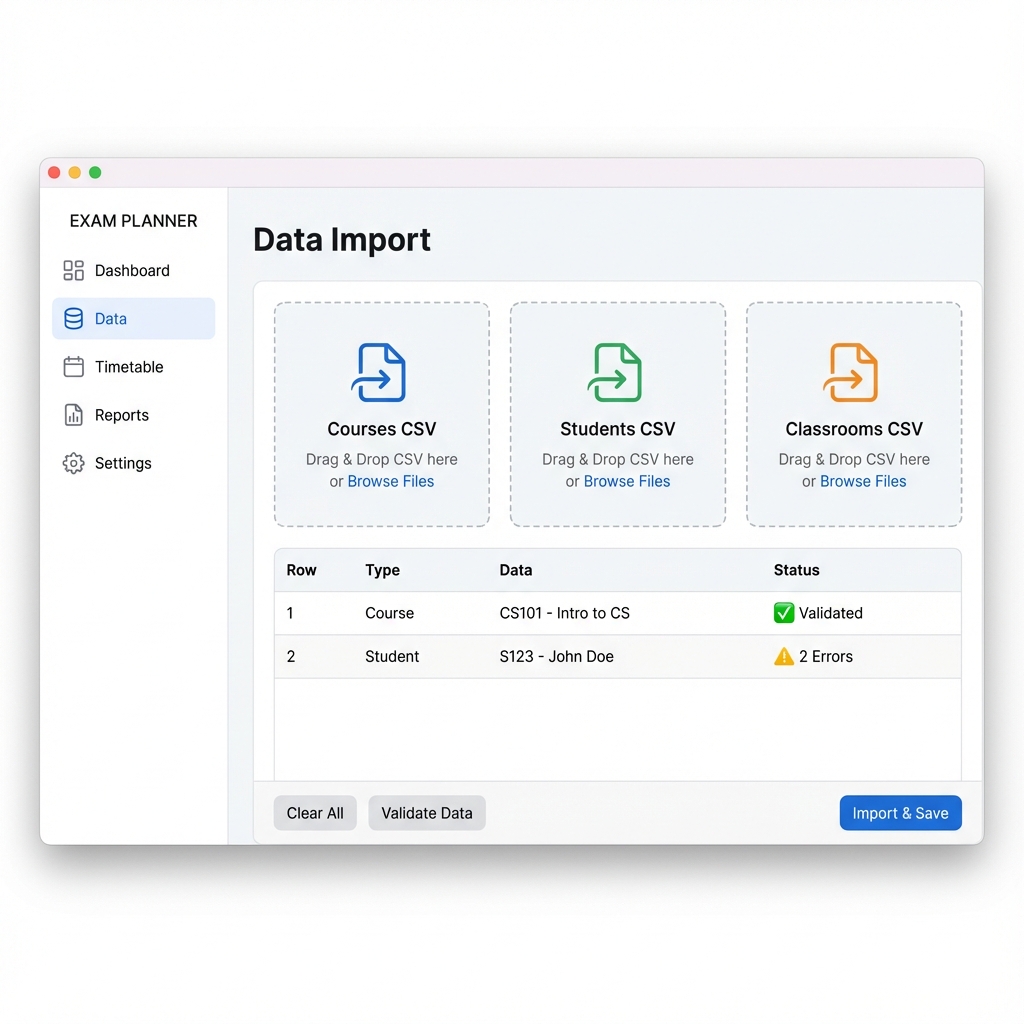
Figure 2: CSV Data Import interface with validation feedback [Screenshot from actual build]
Timetable View
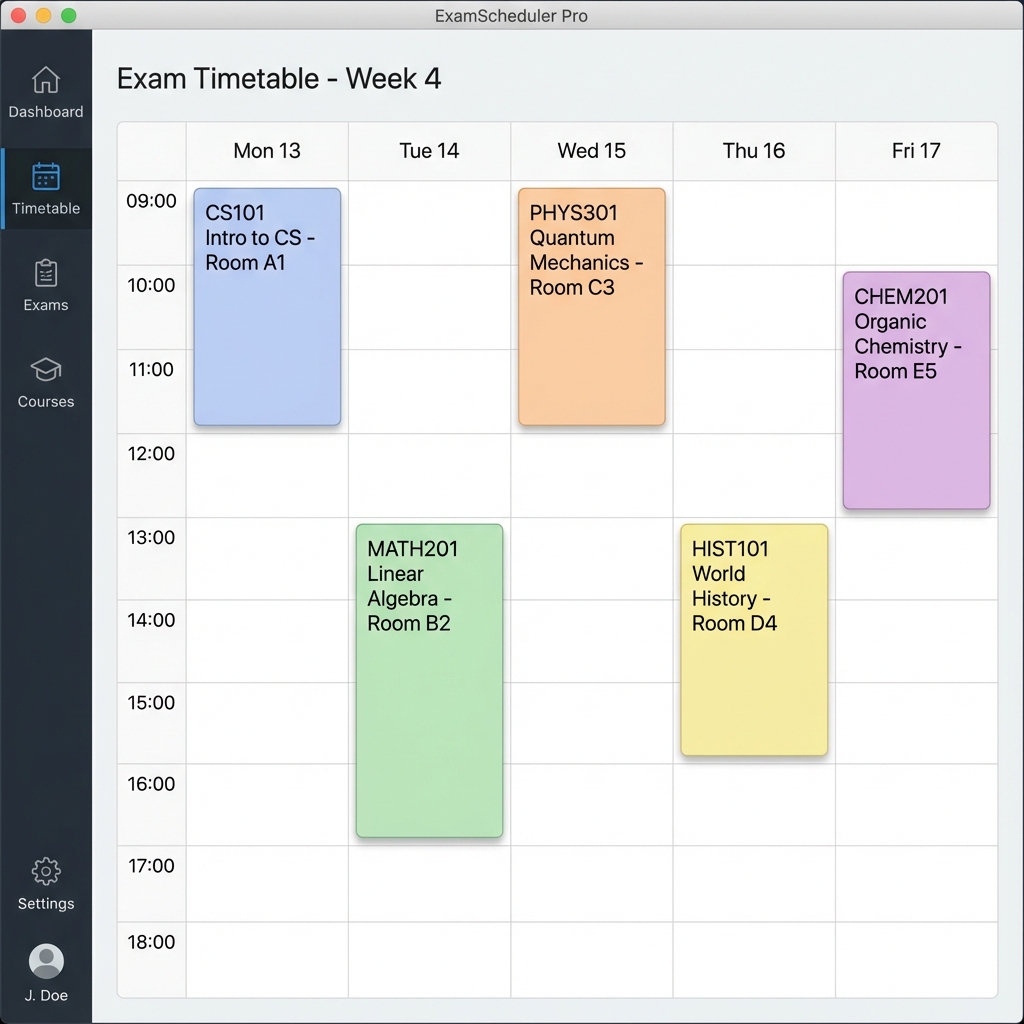
Figure 3: Interactive timetable grid with drag-and-drop support [Screenshot from actual build]
Conflict Detection
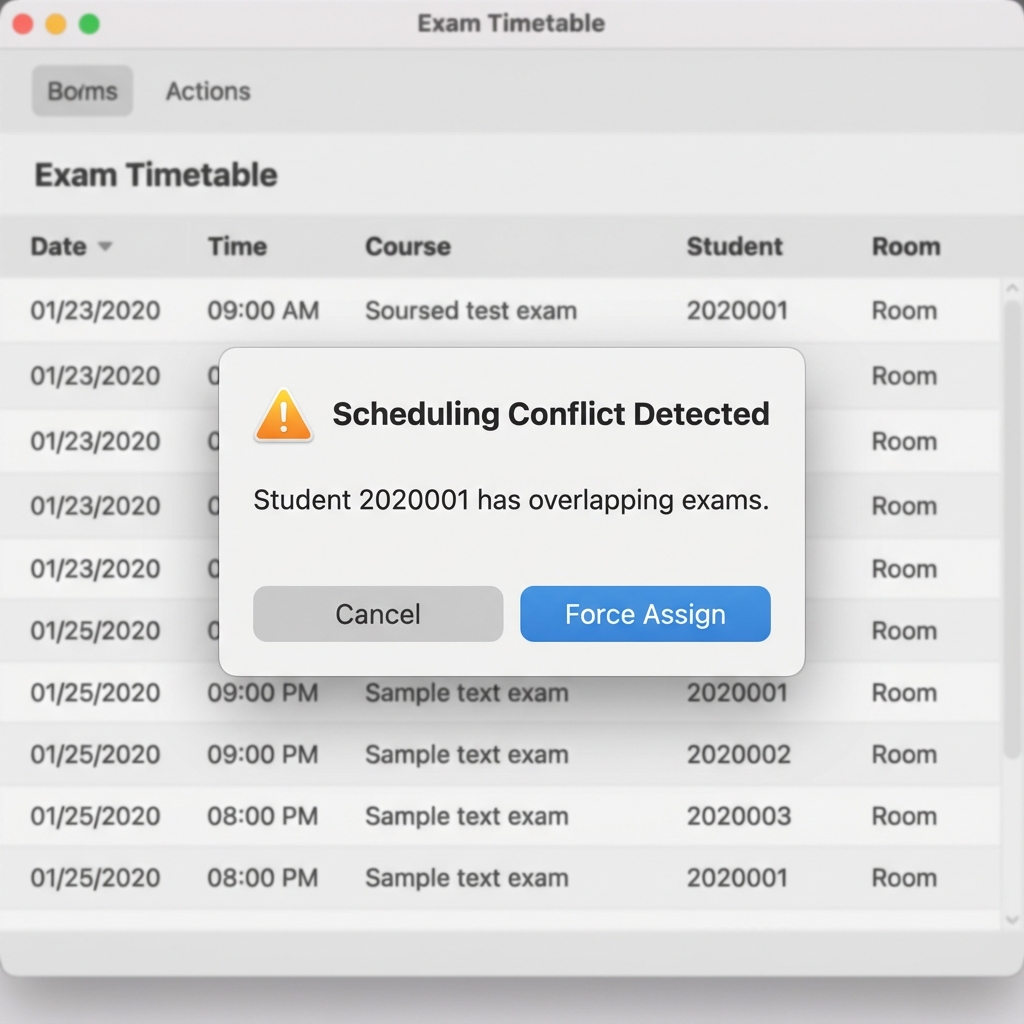
Figure 4: Real-time conflict detection and warning system [Screenshot from actual build]
Export Options
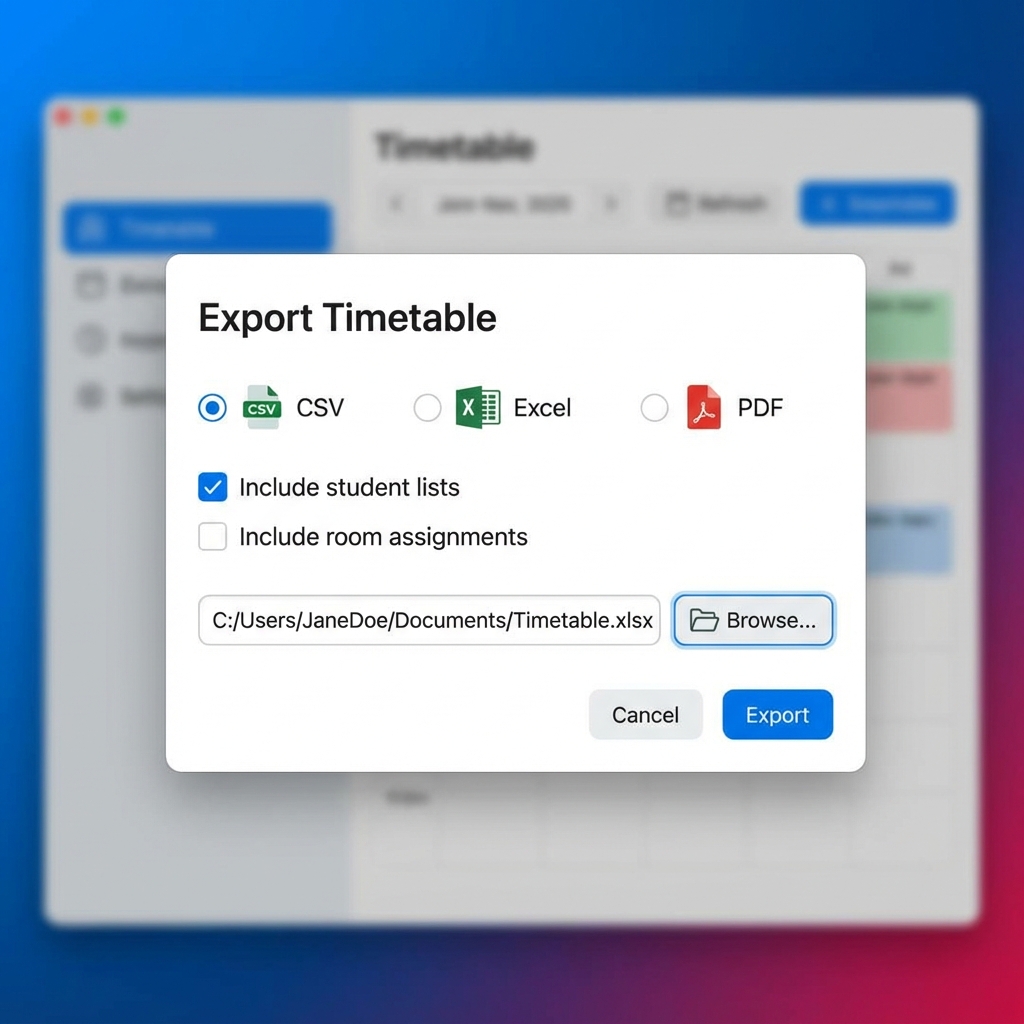
Figure 5: Flexible export options supporting multiple formats [Screenshot from actual build]
Application Flow
flowchart LR
    A[📁 Import Data] --> B[🔄 Validate]
    B --> C[🧠 Generate Schedule]
    C --> D[📊 View Timetable]
    D --> E[✏ Manual Adjustments]
    E --> F[📤 Export]
5 Scheduling Constraints
The scheduling algorithm enforces the following business rules to ensure fair and practical exam schedules:
| Constraint | Description | Value |
|---|---|---|
| Working Hours | Exams can only be scheduled within official working hours | 09:00 - 18:30 |
| Daily Limit | Maximum number of exams a student can have per day | 2 exams |
| Gap Requirement | Minimum time gap between consecutive exams for same student | 3 hours |
| Classroom Exclusivity | A classroom cannot host multiple exams simultaneously | 1 exam/slot |
| Capacity Check | Classroom capacity must accommodate all enrolled students | Required |
| Blackout Dates | Specified dates excluded from scheduling | Configurable |
All manual changes are validated against these constraints in real-time, providing instant feedback to users.
6 Scheduling Algorithm
The core of the application is a Constraint Satisfaction Problem (CSP) solver that uses recursive backtracking. The solver uses heuristics to search for a near-optimal schedule, aiming to minimize the total number of exam days used. Due to the NP-hard nature of the problem, global optimality is not guaranteed, but the algorithm consistently produces high-quality, conflict-free schedules.
1. Binary Search for Optimal Days
Instead of just trying to "fit" exams into a fixed range, the algorithm performs a Binary
Search on the number of days. For any given range [low, high], it attempts to find a valid
schedule for mid days. If successful, it tries fewer days to find the true minimum.
2. Course Splitting (Exam Parts)
To handle large courses that exceed the capacity of any single classroom, the system implements Dynamic Course Splitting:
- Balanced Partitioning: Students are divided into
Nparts whereN = ceil(Students / MaxRoomCapacity). - Simultaneous Scheduling: All parts of a split course are forced into the same time slot across different classrooms to maintain exam integrity.
Algorithm Workflow
flowchart TD
    %% Node Styles
    classDef start fill:#2563eb,stroke:#1d4ed8,stroke-width:2px,color:#fff,rx:20,ry:20
    classDef process fill:#fff,stroke:#cbd5e1,stroke-width:2px,color:#334155,rx:5,ry:5
    classDef decision fill:#fff,stroke:#f59e0b,stroke-width:2px,color:#b45309,rx:5,ry:5
    classDef success fill:#10b981,stroke:#059669,stroke-width:2px,color:#fff,rx:20,ry:20
    classDef fail fill:#fee2e2,stroke:#ef4444,stroke-width:2px,color:#991b1b,rx:5,ry:5
    classDef loop fill:#f8fafc,stroke:#94a3b8,stroke-width:2px,stroke-dasharray: 5 5,color:#475569

    %% Main Flow
    Start([🚀 Start Generation]):::start --> BinSearch{Binary Search Loop}:::decision

    subgraph CSP ["Constraint Satisfaction Core"]
        direction TB
        Sort[Sort Courses (Heuristic)]:::process --> Pick[Pick Most Constrained Course]:::process
        Pick --> CheckTime{Valid Time Slot?}:::decision

        CheckTime -->|Yes| CheckRoom{Valid Room?}:::decision
        CheckTime -->|No| Backtrack[Unit Propagation / Backtrack]:::fail

        CheckRoom -->|Yes| Assign[Assign Resource & Update State]:::process
        CheckRoom -->|No| Backtrack

        Assign --> Complete{All Courses Assigned?}:::decision
        Complete -->|No| Pick
        Backtrack -.->|Retry Next| Pick
    end

    BinSearch -->|Try 'k' Days| CSP
    Complete -->|Yes| Success([✨ Feasible Schedule Found]):::success

    Success -->|Optimize| BinSearch
    Backtrack -->|Unsatisfiable| BinSearch

    %% Link Styles
    linkStyle default stroke:#64748b,stroke-width:2px,fill:none
Figure 6: High-level overview of the CSP-based backtracking algorithm logic.
Scheduling Sequence
sequenceDiagram
    autonumber

    %% Participant Definitions
    actor User as 👤 User
    participant UI as 🎨 MainController
    participant Svc as ⚙️ SchedulerService
    participant Logic as 🧠 ConstraintChecker
    participant Repo as 💾 DataRepository
    participant DB as 🗄️ SQLite

    Note over User, UI: User initiates generation process

    User->>UI: Click "Generate Schedule"
    activate UI
    UI->>UI: Show Loading Spinner (Async)

    UI->>Svc: generateTimetable(courses, rooms, constraints)
    activate Svc

    Note right of Svc: Strategy: Binary Search on Days

    loop For Each Day Count [min..max]
        Svc->>Svc: Sort Courses (Difference Heuristic)

        loop Recursive Backtracking
            Svc->>Logic: validate(slot, classroom)
            activate Logic
            Logic-->>Svc: ✅ Valid / ❌ Conflict
            deactivate Logic

            alt Constraint Violation
                Svc->>Svc: Prune Branch (Backtrack)
            else Feasible Assignment
                Svc->>Svc: Assign & Recurse
            end
        end
    end

    alt Optimal Solution Found
        Svc->>Repo: saveTimetable(finalSchedule)
        activate Repo
        Repo->>DB: Begin Transaction
        activate DB
        DB->>DB: Batch Insert Exams
        DB-->>Repo: Commit Success
        deactivate DB
        Repo-->>Svc: Acknowledge
        deactivate Repo

        Svc-->>UI: return ExamTimetable
        UI->>UI: Render Timetable Grid
        UI->>User: Show Success Notification
    else No Feasible Solution
        Svc-->>UI: throw SchedulingException
        UI->>User: Show Error (Check Constraints)
    end

    deactivate Svc
    deactivate UI
Figure 7: Detailed sequence diagram illustrating the interaction between UI, Service, and Data layers during schedule generation.
3. Advanced Heuristics & Pruning
To avoid the exponential time complexity of pure backtracking, we use several heuristics:
Most Constrained First
Largest courses are scheduled first. This reduces the search space early by filling up heavy constraints while resources are still plentiful.
Smallest Fit (Best-Fit)
Classrooms are assigned by selecting the smallest room that fits the group. This preserves larger rooms for courses that actually need them.
Fail-Fast Pruning
The ScheduleState keeps a bit-mapped index of student assignments, allowing O(1)
checks for daily limits and time overlaps.
Complexity Analysis
| Layer | Complexity | Technical Detail |
|---|---|---|
| Day Search | O(log D) | Binary search over possible day ranges (max 31 days). |
| Placement | O(C × S × R) | Backtracking: C=courses, S=time slots, R=classrooms. |
| Validation | O(E) | E = enrollment count. Using hash-maps for O(1) lookup. |
The algorithm uses early termination and slot caching to improve performance. Large-scale tests show it handles 10,000+ students efficiently.
7 System Architecture
The application follows a strictly Layered Architecture pattern to ensure modularity and scalability. Each component belongs to a specific tier, ensuring that business logic is never coupled with UI rendering.
Architectural Flow
flowchart TD
    subgraph UI_Layer ["🎨 UI Layer (JavaFX)"]
        MC[MainController] --> |Triggers| SM[TourManager/Modals]
        MC --> |Interacts| FXML[FXML/CSS Views]
    end

    subgraph Service_Layer ["⚙ Service Layer (Business Logic)"]
        MC --> SS[SchedulerService]
        MC --> IS[DataImportService]
        SS --> CC[ConstraintChecker]
        SS -.-> ST[ScheduleState]
    end

    subgraph Persistence_Layer ["💾 Persistence Layer (SQLite)"]
        IS --> DR[DataRepository]
        SS --> DR
        DR --> DB[(SQLite Database)]
    end

    subgraph My_Domain ["📁 Domain Layer (POJO)"]
        CC --> D[Student/Course/Exam]
        DR --> D
    end
Layer Responsibilities
Presentation (UI)
Handles user interactions via JavaFX. Uses FXML for declarative UI and CSS for styling. Responsible for asynchronous task management to keep the UI responsive during heavy scheduling.
Services (Logic)
The "brain" of the app. SchedulerService handles the generate-and-check cycle, while
ConstraintChecker enforces academic rules.
Persistence (Data)
Abstracts SQLite operations using the Repository Pattern. Manages connection pooling and ensures transactional integrity during imports.
Domain (Models)
Contains the core business objects. These are immutable plain Java objects that represent the stable data structure of the entire system.
Key Class Relationships
classDiagram
    class Course { +String code }
    class Student { +String id }
    class Exam { +ExamSlot slot }
    class SchedulerService { +generate() }
    class DataRepository { +save() }

    SchedulerService --> DataRepository : uses
    DataRepository ..> Course : persists
    Exam o-- Course : contains
    Exam o-- Student : contains
8 Performance Analysis
Benchmarking Results
| Data Scale | Courses | Students | Gen. Time |
|---|---|---|---|
| Small | 20 | 500 | 150ms |
| Medium | 100 | 3,000 | 600ms |
| Large | 500+ | 10,000 | 1.8s |
9 Technologies Used
| Technology | Version | Purpose |
|---|---|---|
| Java | 21 | Primary programming language |
| JavaFX | 21 | GUI framework for desktop interface |
| SQLite | 3.x | Embedded database for data persistence |
| Maven | 3.9+ | Build automation and dependency management |
| JUnit 5 | 5.10.0 | Unit testing framework |
| Mockito | 5.7.0 | Mocking framework for testing |
10 Project Structure
src/main/java/com/examplanner/
├── domain/                 # Core data models
│   ├── Course.java
│   ├── Student.java
│   ├── Classroom.java
│   ├── Exam.java
│   ├── ExamSlot.java
│   └── ExamTimetable.java
├── services/               # Business logic
│   ├── SchedulerService.java
│   ├── ConstraintChecker.java
│   └── DataImportService.java
├── persistence/            # Data access
│   └── DataRepository.java
└── ui/                     # Presentation layer
    ├── MainApp.java
    └── MainController.java
src/main/resources/
├── MainView.fxml
├── SplashScreen.fxml
├── style.css
└── messages_*.properties   # i18n files
src/test/java/com/examplanner/
├── domain/                 # Domain tests
└── services/               # Service tests
11 API Documentation
Key service classes and their public methods:
SchedulerService
| Method | Parameters | Returns | Description |
|---|---|---|---|
generateTimetable() |
courses, classrooms, enrollments, startDate | ExamTimetable | Generates optimized exam schedule |
setBlackoutDates() |
List<LocalDate> | void | Sets dates to exclude from scheduling |
ConstraintChecker
| Method | Parameters | Returns | Description |
|---|---|---|---|
isWithinTimeWindow() |
ExamSlot | boolean | Checks if slot is within 09:00-18:30 |
fitsCapacity() |
Classroom, Course, Map | boolean | Validates classroom capacity |
hasConflict() |
Student, ExamSlot, List | boolean | Checks student schedule conflicts |
meetsGapRequirement() |
Student, ExamSlot, List | boolean | Validates 3-hour gap requirement |
DataImportService
| Method | Parameters | Returns | Description |
|---|---|---|---|
loadCourses() |
File | List<Course> | Parses courses from CSV |
loadStudents() |
File | List<Student> | Parses students from CSV |
loadClassrooms() |
File | List<Classroom> | Parses classrooms from CSV |
loadEnrollments() |
File | Map<Course, List<Student>> | Parses attendance lists |
12 Testing Strategy
To ensure system reliability and correctness, we adopted a robust testing strategy primarily focused on Unit Testing and Integration Testing. The project utilizes JUnit 5 for test execution and Mockito for isolating dependencies in the service layer.
The Test Pyramid
Our testing approach follows the standard Test Pyramid, emphasizing a strong foundation of fast, isolated unit tests.
pyramid
    "Manual / Exploratory Tests" : 10
    "Integration Tests (Repo & DB)" : 20
    "Unit Tests (Domain & Logic)" : 70
Test Categories
| Category | Focus Area | Key Tools |
|---|---|---|
| Domain Logic | Validating core business rules (e.g., Exam overlap checks, Student capacity) in POJO classes. | AssertJ, JUnit 5 |
| Service Layer | Testing SchedulerService logic by mocking DataRepository to simulate
scenarios without DB. |
Mockito, @InjectMocks |
| Persistence | Verifying SQLite CRUD operations and transaction rollbacks using an in-memory test database. | sqlite-jdbc |
| Scheduling Algorithm | Running complete scheduling cycles with predefined seed data to ensure deterministic outputs. | Parameterized Tests |
Approximate Test Distribution
Note: Coverage metrics are not automatically measured. Values below are estimates.
| Package / Class | Test Classes | Focus Area |
|---|---|---|
| com.examplanner.domain | 6 | Domain object tests (Course, Student, Exam, etc.) |
| com.examplanner.services | 4 | Algorithm, CSV Import, Constraint Validation |
| com.examplanner.persistence | 1 | Database integration tests |
| com.examplanner.ui | 6 | UI tests (TestFX) |
Tests are executed locally via mvn test. No CI pipeline is currently configured.
Coverage metrics are not automatically measured (JaCoCo is not configured).
Example Test Case
Below is a simplified example of how we test the conflict detection logic using Mockito:
@Test
@DisplayName("Should detect conflict when student has concurrent usage")
void shouldDetectConflict() {
    // Arrange
    Student student = new Student("S1", "John Doe");
    ExamSlot slot = new ExamSlot(Day.MONDAY, Time.MORNING);

    // Act
    boolean hasConflict = constraintChecker.hasConflict(student, slot);

    // Assert
    assertTrue(hasConflict, "Student should not be in two exams at once");
}
13 Installation Guide
Prerequisites
- Java Development Kit (JDK) 21 or higher
- Apache Maven 3.9 or higher
- Git (for cloning the repository)
Installation Steps
-
Clone the repository
git clone https://github.com/utkubilir/ExamTimetablePlanner.git cd ExamTimetablePlanner -
Build the project
mvn clean install -
Run the application
mvn javafx:run
Ensure that JavaFX is properly configured in your environment. The Maven POM file includes all necessary JavaFX dependencies.
★ Quick Start (2 Minutes)
- Prerequisites: JDK 21+, Maven 3.9+
- Clone & Run:
git clone https://github.com/utkubilir/ExamTimetablePlanner.git cd ExamTimetablePlanner mvn javafx:run - Demo Flow:
- Navigate to Data Import tab
- Load sample files from
csv's/Small/directory - Click "Generate Schedule"
- View timetable, make manual adjustments if needed
- Export the result via Export button
The csv's/ directory contains sample datasets (Small, Middle, Large, Extralarge)
for testing. Start with Small for quick demos.
14 Project Team
Doğan Mert İlhan
Developer

Utku Bilir
Developer
Deniz Yıldırım
Developer
Arda Barut
Developer
Furkan Galip
Developer
Mert Barmanbek
Developer
15 Frequently Asked Questions
Technical & Performance
What is the maximum capacity the system can handle?
The system has been stress-tested with 10,000+ students, 500+ courses, and 100+ classrooms. Performance remains excellent (<2s generation time) for datasets of this size. For larger institutions, we recommend segmenting data by faculty or department.
Does the algorithm guarantee an optimal solution?
The CSP solver prioritizes finding a feasible solution that satisfies hard constraints over finding a theoretically perfect optimum (which is NP-hard). However, by using heuristics like "Most Constrained Variable First", it consistently produces high-quality schedules that minimize the number of days used.
How are scheduling conflicts handled?
Conflicts are resolved using a backtracking mechanism. If the algorithm encounters a student conflict (e.g., student A has two exams at the same time), it backtracks to the previous assignment and tries a different time slot or day. If no solution is found after exhaustive search, it reports which specific constraint caused the failure.
Usage & Configuration
What file formats are supported for import?
The application strictly supports UTF-8 encoded CSV files tailored for simplicity. Key files needed are:
courses.csv(Code, Name, Duration, etc.)students.csv(ID, Name)classrooms.csv(ID, Capacity)student_course.csv(Enrollment Mapping)
sampleData/ directory.
Can I manually edit the timetable after generation?
Yes. The "Timetable View" supports drag-and-drop actions. You can move an exam to a new slot. The system validates your move in real-time; if your manual change violates a hard constraint (e.g., room capacity exceeded), the move is blocked and an error toast is displayed.
How do I customize constraints (e.g., max exams per day)?
Configuration parameters such as "Max Exams Per Student/Day" and "Minimum Gap Between Exams"
are
currently defined as constants in the ConstraintChecker class. Future
versions
will expose these settings in a UI configuration panel.
Troubleshooting
I get a "Scheduling Calculation Failed" error. Why?
This usually occurs when constraints are too tight. Common causes:
- Total exam durations exceed available time slots.
- A single student is enrolled in too many overlapping courses.
- Insufficient classroom capacity for a large course.
★ CSV File Formats
The application imports data from four CSV files. All files must be UTF-8 encoded.
Courses CSV
Single column, one course code per line. First line is a header (ignored).
ALL OF THE COURSES IN THE SYSTEM
CourseCode_01
CourseCode_02
CourseCode_03
Classrooms CSV
Semicolon-delimited: ClassroomID;Capacity. First line is a header.
ALL OF THE CLASSROOMS; AND THEIR CAPACITIES IN THE SYSTEM
Classroom_01;25
Classroom_02;30
Classroom_03;40
Students CSV
Single column list of student IDs. First line is a header.
ALL OF THE STUDENTS IN THE SYSTEM
Std_ID_001
Std_ID_002
Attendance/Enrollment CSV
Course code on one line, followed by a Python-list-style array of student IDs on the next.
CourseCode_01
['Std_ID_001', 'Std_ID_002', 'Std_ID_003']

CourseCode_02
['Std_ID_004', 'Std_ID_005']Files must be UTF-8. The importer automatically strips BOM characters
and supports both semicolon (;) and comma (,) delimiters.
16 Data Import Strategy
Smart Format Detection (Heuristic Detection)
A detection mechanism named detectCsvKind was developed to prevent users from uploading the
wrong file. This method scans the first 50 lines of the file to analyze column headers and data
patterns. For example, if a line contains ';' and the second part is a numeric value, it understands
that this is a **Classrooms** file. This allows the system to give the "You uploaded the wrong file"
warning before the user even clicks the 'Import' button.
BOM and Character Encoding Solutions
The **BOM (Byte Order Mark)** character frequently found in CSV files exported from Excel could cause
invisible errors in standard Java readers. The stripBom method was developed to clean these
hidden characters at the beginning of each line. A flexible parser structure was also established that
simultaneously supports both semicolon and comma-separated formats.
Data Consistency and Automatic Repair
One of the most critical logics in the system operates during **Attendance** transfer. If a student exists in 'attendance.csv' but is not defined in 'students.csv', instead of stopping the transfer, the system automatically creates this student and saves them to the database. This is an important "fail-safe" mechanism that prevents gaps in the dataset from locking up the entire planning process.
| Control Mechanism | Description | Benefit Provided |
|---|---|---|
| Duplicate Detection | Prevents duplication of the same CourseCode or StudentID. | Warns the user without violating database constraints. |
| Transaction Support | Reverts the database to its previous state if an error occurs during transfer. | Prevents incomplete, corrupt data entry. |
| Validation Logic | Checks if exam durations are positive numbers. | Prevents the algorithm from entering an infinite loop with incorrect durations. |
★
Limitations & Known Issues
- "No feasible solution" error: Occurs when constraints are too tight
(e.g., too many overlapping enrollments, insufficient classrooms, too few available days).
Try increasing the exam period or relaxing constraints.
- Worst-case performance: The backtracking algorithm has exponential worst-case
complexity. Highly constrained inputs with many student overlaps may take significantly longer.
- No UI for constraint configuration: Parameters like max exams/day are set
programmatically via setter methods; a settings UI is planned for future versions.
- No automated CI/CD: Tests must be run locally with
mvn test.
- No coverage reporting: JaCoCo is not configured; coverage metrics are not measured.
- No release packages: The application must be built and run from source.
No installer or executable JAR is provided.
17
Conclusion
★ Limitations & Known Issues
- "No feasible solution" error: Occurs when constraints are too tight (e.g., too many overlapping enrollments, insufficient classrooms, too few available days). Try increasing the exam period or relaxing constraints.
- Worst-case performance: The backtracking algorithm has exponential worst-case complexity. Highly constrained inputs with many student overlaps may take significantly longer.
- No UI for constraint configuration: Parameters like max exams/day are set programmatically via setter methods; a settings UI is planned for future versions.
- No automated CI/CD: Tests must be run locally with
mvn test. - No coverage reporting: JaCoCo is not configured; coverage metrics are not measured.
- No release packages: The application must be built and run from source. No installer or executable JAR is provided.
The Exam Timetable Planner project has successfully achieved its primary objective of automating the exam scheduling process. By leveraging a Constraint Satisfaction Problem (CSP) solver and a user-friendly JavaFX interface, the system transforms a weeks-long manual task into a sub-second automated operation.
Key successes include the robust handling of large datasets (10,000+ students), the "fail-safe" data import strategy, and the implementation of a responsive, modern UI that adheres to strict software engineering principles. The system not only saves time but also guarantees conflict-free schedules, significantly improving the operational efficiency of educational institutions.
The project is a functional prototype suitable for academic evaluation. It has been tested with ~120 unit tests across domain, service, persistence, and UI layers. No production packaging (installer/release) is provided. Further hardening (logging, error recovery, security audit) would be required for production deployment.
18 References
- GitHub Repository: https://github.com/utkubilir/ExamTimetablePlanner
- JavaFX Documentation: https://openjfx.io/
- JUnit 5 User Guide: https://junit.org/junit5/
- SQLite Documentation: https://www.sqlite.org/